Open
Built for families who want serious offshore capability,
premium comfort and the freedom to fish, cruise or entertain.
Open 402
NEW Open 352
NEW Open 322
NEW Open 302
Open 282
Open 262
Open 252
Open 232
Open 212
Heritage
A refined crossover lineup designed for coastal cruising, ample seating,
family days and some fishing when the moment calls for it.
NEW Heritage 321
Heritage 261
NEW Heritage 251
Heritage 231
Masters
Shallow-water performance, fishing-focused layouts and
everyday comfort built for family life and fishing.
Perfect blend of offshore capabilities with inshore conveniences.
NEW Masters 288
Shallow-draft bay boats built around casting space, livewells and skinny-water fishing.
Masters 267
Masters 267OE
Masters 247
Masters 247OE
Masters 227
Growing technology developments have allowed for advanced systems to be added to smaller boats giving captains many more features only previously seen on larger vessels. Autopilot is a growing option trend in the marine industry for smaller boats and here at Sportsman we seeing that trend grow as more and more buyers are adding this optional equipment. This is a quick explanation and walkthrough on how to use your Yamaha autopilot system.
-
•Boat autopilots are getting closer to hands off operation but still require a person at the helm for safety.
-
•Using a Garmin MFD autopilot involves four steps: access navigation charts, select route points, finalize the course and activate autopilot.
-
•For safety, use autopilot offshore with radar collision alerts and maintain active supervision to intervene if needed.
With the growth in modern technology we've seen major advancements in the systems that run our everyday lives. The use of AI can help you do a lot of simple tasks to increase productivity, you can talk to your phone as if it's your personal assistant to schedule meetings, set reminders, and even control systems in your home. Furthermore, our vehicles have taken auto detection of objects for safety to an entirely new level. Now a lot of newer vehicles can pretty much drive themselves as long as you've got a hand on the wheel using sensors and good old fashioned cruise control. Some manufactures have even developed autonomous vehicles, you can go fully hands off and tell it where to go and boom you're in the hands of a robot computer.
Those features aren't quite as advanced within the marine industry but they're pretty darn close. Gone with the days of poor mans autopilot, tying ropes to your rudder or steering wheel to hold your heading. Today a lot of boat manufactures offer the option to add autopilot to your boat for advanced navigation. Unlike your car, your boat isn't going to slow down or speed up by itself, nor is it going to dodge another boat or obstacle in the water. It's simply holding your heading in a direction and making sure you travel along a single plane taking you to your destination. This allows you as a captain to set the speed and sit down in captains chair and ride WHILE VISUALLY MAINTAINING YOUR HORIZON to avoid any obstacles or other boaters. These systems are best used well offshore away from any other boat traffic. If paired with a radar system you can also set up collision alarms for nearby vessels or obstacles.
A recent Tech Talk video hosted by Sportsman Boat's Technical Sales Representative, Chase Schelble goes over the key features and steps to planning a course within your Garmin MFD. This can be done very easily and quickly for anyone navigating offshore.
In the video Chase covers 4 steps to setting and activating your autopilot course.
Step 1: Accessing Navigation Charts
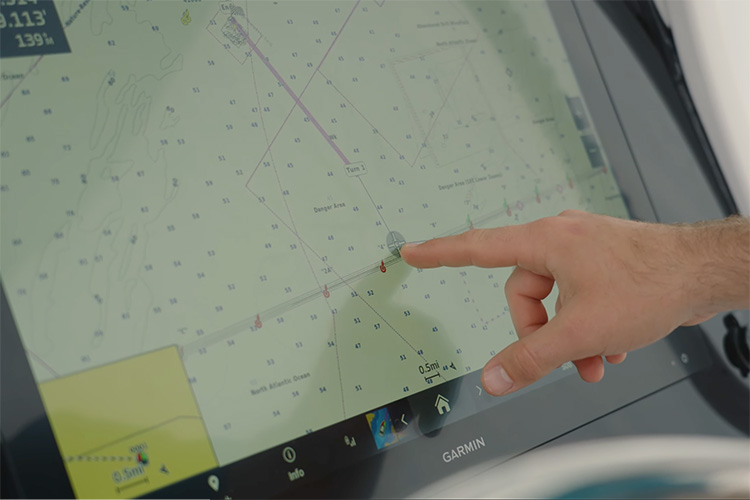
The initial step involves accessing the navigation charts on the Garmin MFD. Users should press the home button, navigate to charts, and select the 'nav chart' option.
Step 2: Selecting Route Points
Next you'll want to choose your destination. Do this by navigating to that point on your MFD and tapping it on the screen, you can also search the GPS coordinates for unmarked spots on the map. Once selected you'll want to hit the 'route to' button. This allows you to set points and plan a route including turns.
Step 3: Finalizing The Course
Once you've plotted the start and end points along with any turns needed throughout you can complete your course layout. You'll want to select the 'done' button, this will complete the course and allow you to activate it on your autopilot control panel located on the dash. You can also save routes that you may frequently use, this also allows you to plan a route before a trip so it's ready to go.
Step 4: Activating Autopilot
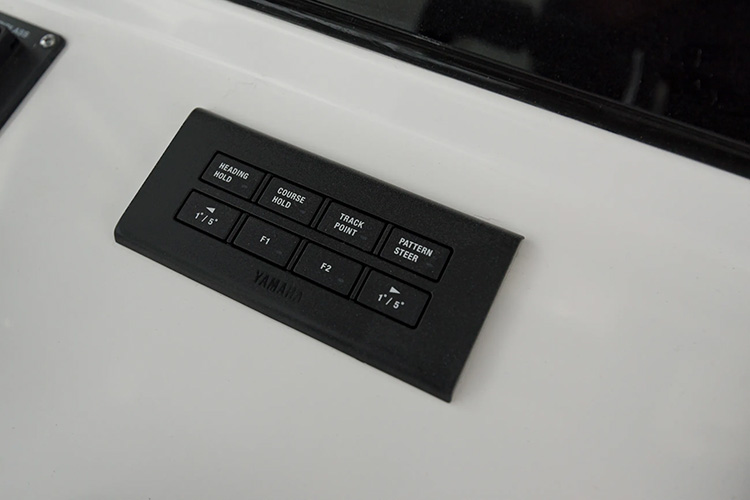
To engage autopilot, you will head to the Yamaha autopilot track pad. Holding down the track point will initiate the autopilot system, guiding the boat smoothly along the pre-determined waypoints towards the final destination. Once activated you will then use your throttle to control the speed of your boat while it controls steering and heading.
Additional Safety Reminder
This system is again not intended for unmanned operation. While autopilot technology is convenient, it is strongly recommended to have someone positioned behind the steering wheel or helm for safety reasons. This ensures quick intervention in case of any deviation from the waypoints. The modern technology has a lot of great safety features but it's not a guarantee for you to step away from the helm.
These systems are great options to look into adding to your Sportsman Boat or any boat for that matter. Just like cruise control in your car it makes a long ride a little more relaxing while still paying attention to what's going on around you. With how quickly technology is developing around us we are seeing more and more autonomous cars, who knows, maybe one day we will have fully autonomous boats.
For any questions or to request specific Tech Talk video ideas reach out to us at techtalk@sportsmanboatsmfg.com.