Open
Built for families who want serious offshore capability,
premium comfort and the freedom to fish, cruise or entertain.
Open 402
NEW Open 352
NEW Open 322
NEW Open 302
Open 282
Open 262
Open 252
Open 232
Open 212
Heritage
A refined crossover lineup designed for coastal cruising, ample seating,
family days and some fishing when the moment calls for it.
NEW Heritage 321
Heritage 261
NEW Heritage 251
Heritage 231
Masters
Shallow-water performance, fishing-focused layouts and
everyday comfort built for family life and fishing.
Perfect blend of offshore capabilities with inshore conveniences.
NEW Masters 288
Shallow-draft bay boats built around casting space, livewells and skinny-water fishing.
Masters 267
Masters 267OE
Masters 247
Masters 247OE
Masters 227
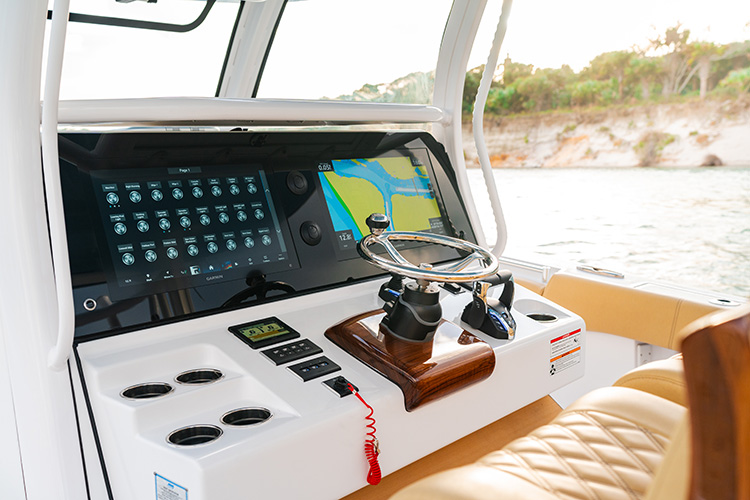
Learn how to enable and disable sonar on your Garmin display, protect your thru-hull transducer out of the water, and restore sonar after launching.

Using your Garmin display doesn’t always mean you need the sonar running. When your Sportsman is on a trailer or boat lift, you may want to use the screen while keeping the thru-hull transducer from transmitting. Garmin provides a quick way to control sonar directly from the display’s power menu.
Knowing where to find that setting—and remembering to enable sonar after launching—helps you care for your equipment and have it ready for your next trip.
Why disable sonar when the boat is out of the water?
A transducer needs to be submerged to receive usable sonar returns and provide depth readings. Water also helps cool the transducer during operation, particularly with higher-powered models.
Running a transducer out of the water for an extended period can cause overheating and internal damage. Garmin recommends disabling sonar transmission whenever the transducer is not submerged. That makes this setting especially useful when you’re using the display with the boat on a trailer or raised out of the water on a lift. Garmin’s transducer guidance
How to disable sonar
The power menu gives you access to the sonar control without navigating through several settings pages.
- Briefly press and release the power button on your Garmin display. On the display featured in this Tech Talk, it is in the bottom-right corner.
- Select “Disable All Sonar Transducers.” Garmin may abbreviate this label to “Disable All Sonar Trans.” or use “Disable All Sonar,” depending on the display.
- Check that the option changes to “Enable All Sonar Transducers.” This is the option you’ll use when you’re ready to resume sonar operation.
This control stops sonar transmission while allowing you to continue using the display. Because it is an all-sonar command, it applies to all sonar transmissions controlled by that setting. Garmin’s sonar control instructions
How to enable sonar after launching
Once the boat is back in the water and the transducer is submerged, return to the same menu:
- Briefly press and release the power button.
- Select “Enable All Sonar Transducers.”
- Return to your sonar screen and check that sonar returns and a depth reading appear.
Make this check part of your launch routine, especially if you used the electronics while the boat was out of the water. If the display is on but sonar isn’t returning readings, checking whether transmission is still disabled is a useful first step.
A quick visit to the power menu lets you stop sonar transmission before taking the boat out of the water and restore it when you’re ready to use it again.